A good business phone system does quiet, steady work all day. It greets callers, routes each one to the right person, follows your team from the front desk to the job site, and keeps every location connected under one set of numbers. When the system fits your business, customers reach you on the first try and your staff spends the day helping people instead of transferring calls.
We help companies across Oahu, Maui, and the Big Island choose and install business phone systems, and owners ask us the same practical question again and again: with so many options, how do you actually pick? Here is the framework we walk through with every client.
Start with how your team actually communicates
Before comparing products, write down how calls really flow through your business. How many people need a line or extension? Does someone answer at a front desk, or does everyone pick up? Do employees work from home some days, or move between islands? A retail shop with three staff members needs something very different from a medical office with two locations and a billing department. Ten minutes with these questions narrows the field of business phone systems more than any brochure.
Cloud hosted VoIP or on premise PBX
The biggest fork in the road is where the system lives. An on premise PBX is a phone server installed at your office, and it gives you full local control of your hardware. A cloud hosted VoIP system runs in secure data centers and delivers calls over your internet connection, so your desk phones, computers, and mobile apps all connect to the same service. Here is how the two compare for a Hawaii business:
| What to compare | On premise PBX | Cloud hosted VoIP |
|---|---|---|
| Equipment at your office | Phone server plus handsets | Handsets and your existing internet |
| Adding a new employee | Depends on server capacity | Added in software in minutes |
| Offices on multiple islands | Separate system at each site | One system covers every location |
| Where calls can be answered | At the office | Office, home, or mobile app |
| Software updates | Applied during service visits | Delivered automatically from the cloud |
Most Hawaii businesses we work with today choose a cloud hosted business phone system, because one system can cover an office in Aiea, a storefront in Wailuku, and a technician on the road, all sharing the same numbers and voicemail. Inter island calling simply becomes an extension dial.
Business phone system features that earn their keep
Feature lists on business phone systems run long, so focus on the ones your team will use daily: an auto attendant that greets and routes callers, voicemail delivered to email, a mobile app that lets your business number ring on a personal phone, and built in video meetings. The unified communications platform we install for Hawaii clients includes some capabilities worth calling out specifically:
- HD video, voice, chat, and desktop sharing in one application, so a phone call can become a screen share without switching tools
- Encrypted call recording stored in the cloud with unlimited playback for seven years
- AI powered transcription and sentiment analysis that turn recorded calls into searchable, reviewable text
- Call queues that scale from a single receptionist up to full contact center routing
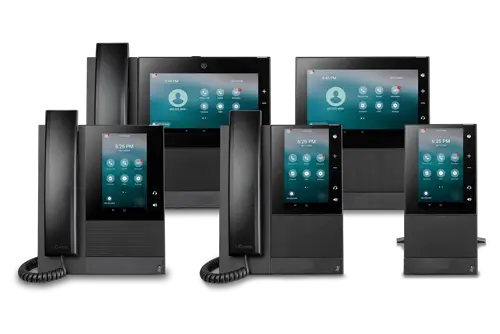
- IP faxing that delivers faxes straight to email, with business grade Polycom VVX handsets on the desk
If a feature sounds useful, ask to see it demonstrated with your own call flow. A five minute demo tells you more than a spec sheet.
Check your network before you commit
Call quality on a modern business phone system rides on your internet connection and office network. Before installation, it pays to confirm you have enough bandwidth for simultaneous calls, that your router prioritizes voice traffic, and that your wiring supports the handsets you want. Our own local Hawaii IT team reviews all of this as part of a phone project, so the system sounds clear from the first day instead of after a round of troubleshooting.
What a business phone system installation looks like
Every business phone system installation we do follows the same steady path. We start by mapping your call flow and building the auto attendant menus around it, so callers hear your greeting and reach the right person from day one. We configure each handset and mobile app before the switch, coordinate number porting behind the scenes, and schedule the cutover for a time that keeps your business running. Then we train your people on the phones each of them will actually use, in your own space, and the local staff who set the system up are the same people who answer your follow up questions.

Why local support across the islands matters
A business phone system is one of those things you want installed, ported, and supported by people you can meet. We have served Hawaii businesses since 1997 and operate five locations across Oahu, Maui, and the Big Island, so training happens in your conference room and support comes from a familiar voice in your own time zone. We also handle number porting, which means you keep the phone numbers your customers already know while everything behind them gets better.
Common questions about business phone systems in Hawaii
What happens to calls if the office internet goes down?
With a cloud hosted system, the service that answers and routes calls lives in the data center, not in your office. Callers still reach your auto attendant, and calls can ring the mobile app on your staff’s phones or forward to another location until your office connection is back.
Can we keep our current phone numbers?
Yes. Number porting moves your existing numbers onto the new service, and we manage that process for you. Your customers keep dialing the numbers they already know, and calls simply start arriving through the new system.
Do we need separate systems for offices on different islands?
No. One cloud hosted business phone system covers every location, so an office on Oahu, a shop on Maui, and a warehouse on the Big Island all share the same numbers, voicemail, and company directory. Calling a coworker on another island is an extension dial, not a long distance call.
Get a clear recommendation for your business
Choosing a business phone system in Hawaii comes down to knowing your call flow, picking where the system should live, focusing on features your team will really use, and making sure your network is ready. If you would like help working through those steps, we offer a free assessment. It is a friendly, no pressure conversation about how your team communicates today and which system would serve you best, and it usually takes less than an hour.